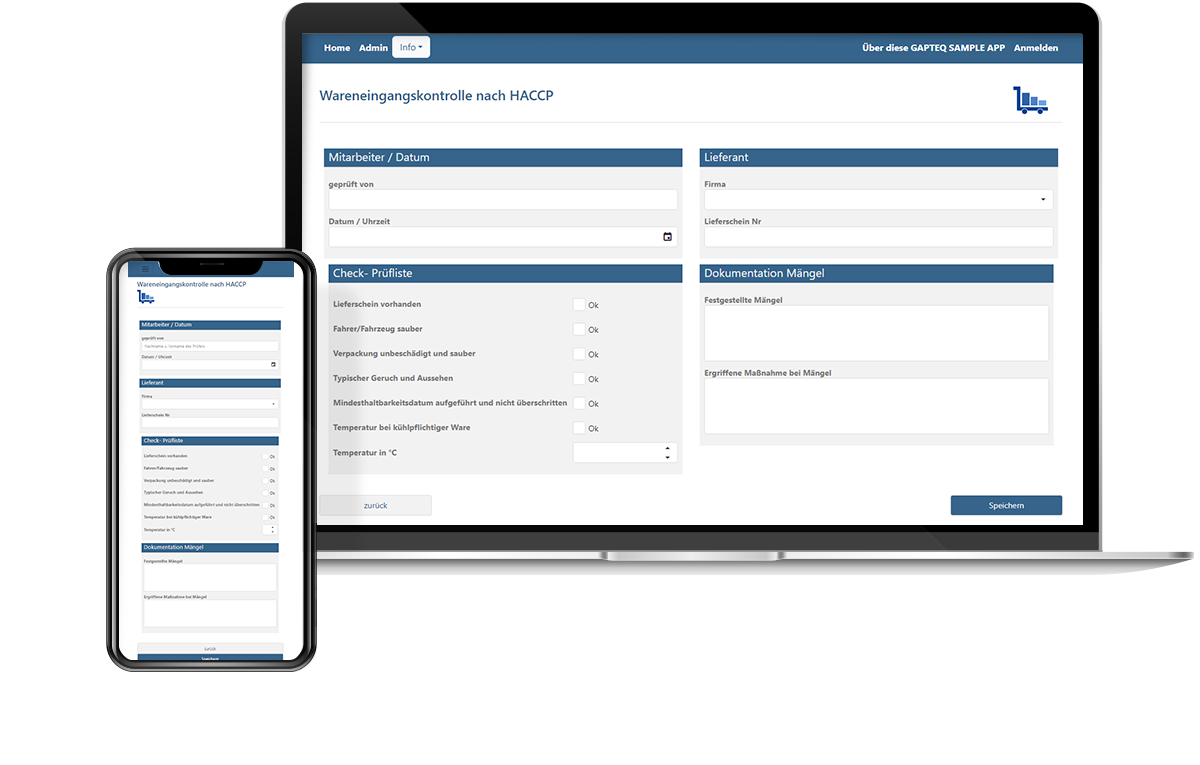










Replacing Excel: Converting Processes into Structured Applications
Convert your legacy Excel solutions into structured, web-enabled applications. With GAPTEQ’s low-code platform, you can turn existing Excel files into productive business applications—without a major IT project, and with a centralized foundation for collaboration that eliminates version chaos.
When does Excel reach its limits in a business setting?
Version chaos and parallel copies
Significant coordination effort
Error-prone data entry
Limited collaboration
Lack of process control
Increasing complexity
“With GAPTEQ, I can build web-enabled database interfaces and applications faster than with any other solution I’ve seen so far!”
Matthias Storck, Board of Directors of Ceteris AG
Which Excel applications can be replaced by a web application?
Centralized management of customer, product, or order data in Excel.
e.g., customer lists, product overviews, or order directories
Recording of test reports, notifications, and other internal information. Often handled by multiple parties and lacking a clear structure.
e.g., quality inspections, trouble reports, maintenance logs
Mapping of approvals or workflows, including status columns, comments, and manual handoffs.
e.g., approval processes, authorizations, internal coordination
Excel files developed over the years to meet the specific needs of individual departments, some of which had become business-critical and difficult to understand.
e.g., production planning, forecast calculations, inventory management
How does replacing Excel with a low-code platform work?
Import and centralize existing Excel data
Scattered Excel files are transferred to a central data source and consolidated into a single, structured format. Existing data can be imported and reused in the process.
Build a Structured Application
Based on your requirements, a structured application is built in just a few hours – one that clearly reflects and supports your existing processes. If needed, this includes status displays, responsibilities, and notifications.
Enable collaboration
Multiple users can work on the same data at once, each in their assigned role, without creating extra coordination efforts or version conflicts.
Targeted Development
New requirements can be added in a controlled, traceable way – without cluttering the application or resorting to Excel workarounds. Your solution adapts to changing processes, not the other way around.
Why is GAPTEQ a good alternative to Excel for businesses?
Integration with existing systems
GAPTEQ applications become part of your IT infrastructure and access existing data sources and systems. With real-time synchronization, without creating new silos.
Web-based access
Applications are browser-based and can be used regardless of location or device.
Multi-user and role-based
Multiple users can work on the finished application simultaneously and reliably, with clearly defined responsibilities and workflows.
Security & Compliance
Maintain full control over infrastructure, data, and permissions. Centrally managed and traceable.
“Working with GAPTEQ has been an inspiration. We were surprised at how quickly and easily it helped us meet our requirements.”
Bernd Lauer, Managing Partner, HOLZMANUFAKTUR GmbH
Frequently Asked Questions About Replacing Excel
As soon as Excel files become central to business processes, multiple people work on them simultaneously, and decisions are based on the data within them, replacing them makes good business sense. Common triggers for our customers often include: version chaos among files circulating in parallel, recurring formula errors, a lack of traceability for changes, or a single employee who is the only one who truly understands the file. At the very latest when Excel has become “shadow IT,” it’s worth making the switch to a structured application, as customers such as Köster, Südpack, or BYK have done with GAPTEQ.
The risks usually arise gradually: what starts as a pragmatic solution eventually becomes the central working foundation for entire teams, but without the necessary structure, transparency, or governance. Typical consequences include wasted time due to manually merging versions, a high risk of errors caused by changes that are difficult to trace, and a reliance on specific individuals who understand the logic behind complex files. The situation becomes critical at the latest when multiple people work on the same data simultaneously or when approvals and responsibilities are managed via email—because that’s not what Excel was designed for.
Existing data is not lost but serves as the foundation for the new application. With the built-in CSV importer, even large amounts of data can be easily transferred to the database without any programming knowledge. Automatic mapping of database fields ensures an error-free import. The new application thus builds directly on your existing data.
Yes, GAPTEQ can be run entirely on-premises—on your own server, a virtual machine, or in a container. The data never leaves your own infrastructure, which is particularly important for companies with strict data protection or compliance requirements. Alternatively, cloud hosting on Microsoft Azure is available. Which option is right for you depends on your specific IT requirements—both options are fully production-ready.
With GAPTEQ, a first working application can typically be created within a few hours to a few days—depending on the data structure and process complexity. Because applications are configured visually using drag-and-drop rather than programmed, the time-consuming development cycle typical of traditional software projects is eliminated.
In traditional custom development, developers write the application line by line, which involves significant effort, long project timelines, and a corresponding investment. With GAPTEQ, the application is assembled visually: the user interface, logic, and permissions are created through configuration, and programming is used only where it provides real added value. The result is significantly shorter implementation times, better maintainability, and full control over your own solution.
No, not everything needs to be replaced. Excel remains useful when used for what it was designed for: static data analysis, one-time calculations, or individual evaluations that don’t require coordination. The Excel files that are being replaced are specifically those that have become process solutions—that is, those used in situations where structured data management, clear responsibilities, and multi-user operation are actually required.
No, you don’t necessarily need your own developers. GAPTEQ applications are configured using drag-and-drop and can be set up independently after a brief training session. For more complex projects, GAPTEQ offers optional support in the form of training, coaching, or full-service implementation.
Build your own application with GAPTEQ today!
With the predefined components, it’s especially easy to build your very first application. Try us out with your own unique project and create your GAPTEQ account in just a few steps—no payment information required!